- Be respectful. Engage in meaningful, constructive conversation. Personal attacks, harassment, threats, or any other form of offensive behavior will not be tolerated.
- Keep it clean (PG-13). No profanity, nudity, thongs, sheer or see-through clothing, lewd or provocative poses, close-ups of private body areas, or any other non–PG-13 material. You may not post abusive, obscene, violent, gruesome, vulgar, slanderous, hateful, threatening, racist, sexually oriented, or unlawful content.
- Quality over quantity. Spam, low-effort posting, and repetitive content are prohibited. Focus on thoughtful contributions.
- Enforcement. Any violation may result in a warning or ban, at the sole discretion of the moderating staff.
- Privacy. Do not post another person's personal information without their explicit consent. Protect your own privacy by avoiding the sharing of sensitive personal details.
- No financial solicitation. Members may not use the forum for personal financial gain (e.g., requesting donations, posting paid links, or promoting outside ventures) without prior approval from a moderator or site representative.
Private Information
- IP Logging. The IP address of each post is recorded to help enforce these rules.
- Moderator Rights. Administrators and moderators may remove, edit, move, or close any topic at any time, at their sole discretion.
- Data Storage. By using this forum, you consent to the storage of information you provide in our database. While we do not share this information with third parties without consent, we cannot be held responsible for breaches caused by hacking.
- Cookies. This forum uses cookies to improve your browsing experience. You are responsible for remembering your login details. Administrators and moderators are not responsible for lost or forgotten information.
- Private Messages. By accessing this site, you acknowledge that administrators and moderators may review private messages when investigating moderation issues.
- Content Ownership. All original content you create on this site becomes the property of the site. You retain no ownership rights once it is posted.
Age Requirement
This site complies with the U.S. Children's Online Privacy Protection Act (COPPA). Users must be at least 13 years of age to create an account. By agreeing to these terms, you confirm that you are over 13 years of age. We do not allow users under 13 to participate, and therefore do not provide parental consent forms.
Account Deletion
Inactive accounts may be removed at any time, without prior notice. The time frame for removal may vary at the discretion of the administrators.
Terms
- By registering as a member, you waive the right to pursue legal action against this site, its owners, or its staff regarding your use of the forum.
- These rules and terms are subject to change at any time. Continued use of the forum constitutes agreement to the most recent version of these terms.
- Use of this site also signifies acceptance of our Terms of Service.
Questions?
If you need clarification or assistance, please use the "Contact Moderator" feature or send a private message to a moderator.
The Report Feature
49erswebzone.com now features a "Report" button, which is located at the bottom of each post, next to the quote and PM buttons. This is ONLY to be used to report spam, advertising messages, and problematic (harassment, fighting, or rude) posts.
The report button should not be used just because you don't get along with someone or you disagree with them, unless within the dialogue there has been a blatant disregard for the rules.
Please refrain from using the report button as a joke. On our end the report does show who made the report, at what time, etc. and any abuse of the report system may result in a warning and/or banning.
The Blocking Feature
You will be permitted to block posts of up to 20 members.
To access this feature, access a user's profile page by clicking on their name. When you arrive on their profile page, there will be a button on the left hand side labeled, "Hide Posts by". Once clicked it will have hidden that users posts for you.
To take someone off of the Hidden Users list, access the Members Area which can be found near the top of the page. Once in the Members Area, on the left hand side under Sections, you will see a "Hide Posts by Users" link, if you click this it will bring up a list of users currently being hidden. Select the user or users that you wish to remove from your Hidden list, click "Remove from Hidden List", and that user's posts will no longer be hidden.
Listed below are instructions for using some of the functions in the toolbar at the top of the Reply section
- Insert a Link
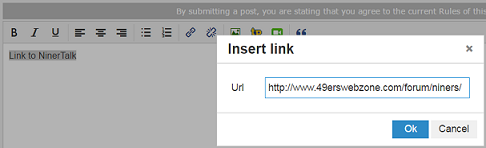
1. Select and Copy the link (URL) of the webpage to be linked. (Control+C for PC, Command+C for Mac)

2. In the Reply section, type the text that will contain the link i. It can be a single word or a text string.
3. Select the text created in Step 2.

4. Press the 'Insert/edit link' button.

5. Paste the link from Step 1 into the pop up window. (Control+V for PC, Command+V for Mac).
Click 'OK'.
.
.
.
- Post an image from the web
1. Right click the image to be posted.
2. Select the option, 'Copy image address'. This will copy the link of the image to the clipboard (not seen).
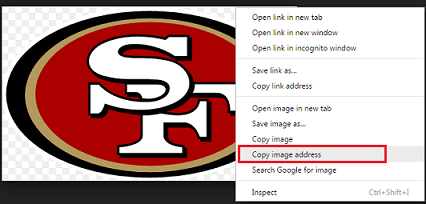
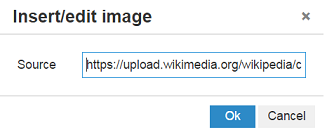
3. In the Reply section, press the button 'Insert/edit image'.

4. Paste the URL of the image into the pop up window. Click 'OK'.
.
.
.
- Post a YouTube clip
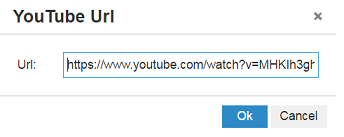
1. Select and Copy the URL of the clip.

2. In the Reply section, press the 'YouTube' button.

3. Copy the link into the pop up window. Click 'OK'.
.
.
.
- Embed a tweet
1. Click the '...' button on the feed. Select 'Copy link to Tweet'.

2. Select and Copy the link.
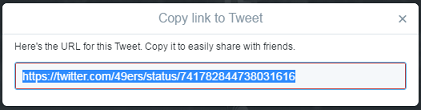
3. In the Reply section, type:
[tweet
4. Paste the link that was copied in Step 1. Close bracket. (See format below). Tweet will be seen once Reply is posted.

Questions?
Please use the "contact moderator" feature or send the moderators a private message.
(Updated 3 March 2020)


